New login system, new path plot tool, licensed backhauls
The new login system started rolling out to ISPs this month, with passkeys, two-factor authentication and email invites. The customer page path plot tool was rebuilt on the RF coverage system with LIDAR terrain, and the new network map becomes the default on October 6. Also in September: monitoring modes and ignored issues, and support for four families of licensed microwave backhauls.
New login system New
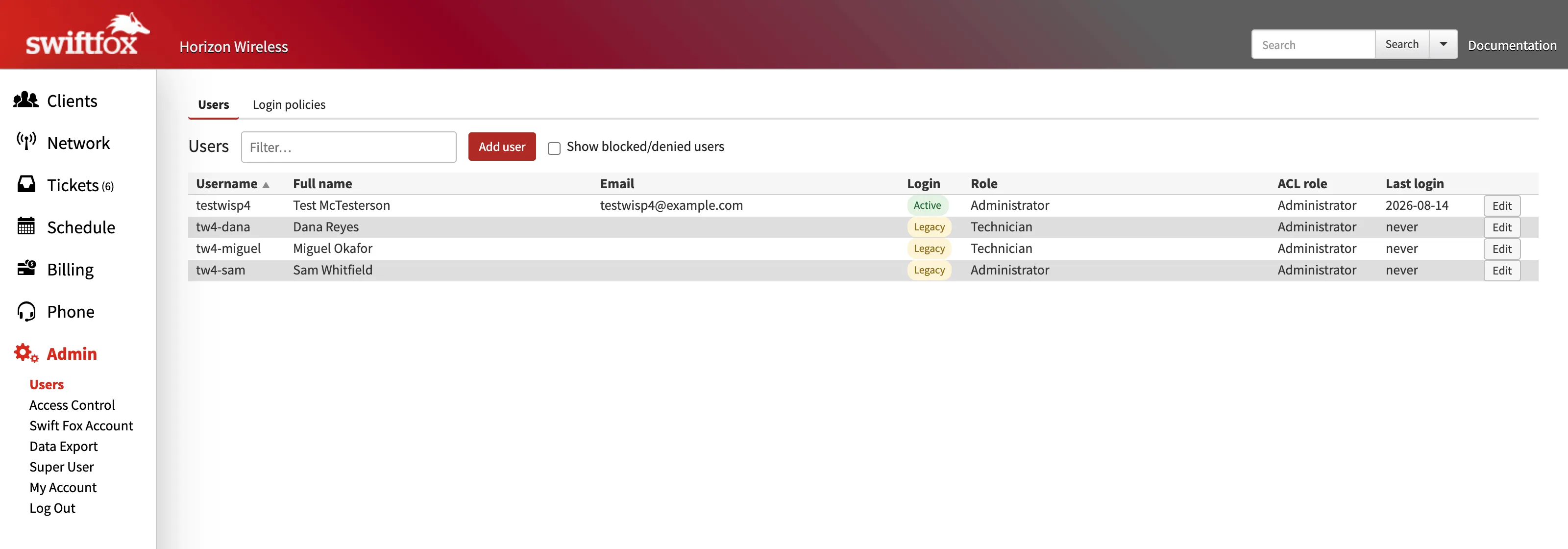
Swift Fox logins are moving to a new system that supports passkeys, two-factor authentication (authenticator apps and security keys), and email invites for new users. It's rolling out one ISP at a time. When it reaches yours, the login page asks for your username or email first, and a red "Verify Your Email" box shows up in the left menu after you log in. Clicking it confirms your email address with a 6-digit code and has you choose a new password, which takes a couple of minutes.
Once you've verified, you still start from your usual (isp).swift-fox.net login page, but you'll get sent to auth.swiftfox.net to enter your password (without the hyphen). This might mean your password manager needs to be updated to use the new URL. Once you're logged in, the "Change Password" link in the left menu becomes a "My Account" page, where you can change your name, username, email and password, and add two-factor or passkey options if you like.
Each person needs their own email address for login. If a few people at your ISP share one address, only one of them can verify with it and the others will need to change theirs during the verify step. Addresses that only exist to receive pages can be set up by an admin as "service accounts", which can receive pages or be assigned tickets, but aren't allowed to log in.
ISP admins get a rebuilt user admin page: invite new users by email, see who has moved to the new login, reset passwords, manage a user's two-factor methods, and deactivate a user (which revokes their access on the new login as well). A Login policies tab lets you set your own password complexity, expiry and two-factor requirement rules for your team.
For now the verify box is only a reminder and your current password keeps working. Verification will become required later on, and we'll announce the dates well ahead of time.
New customer path plot tool Improved
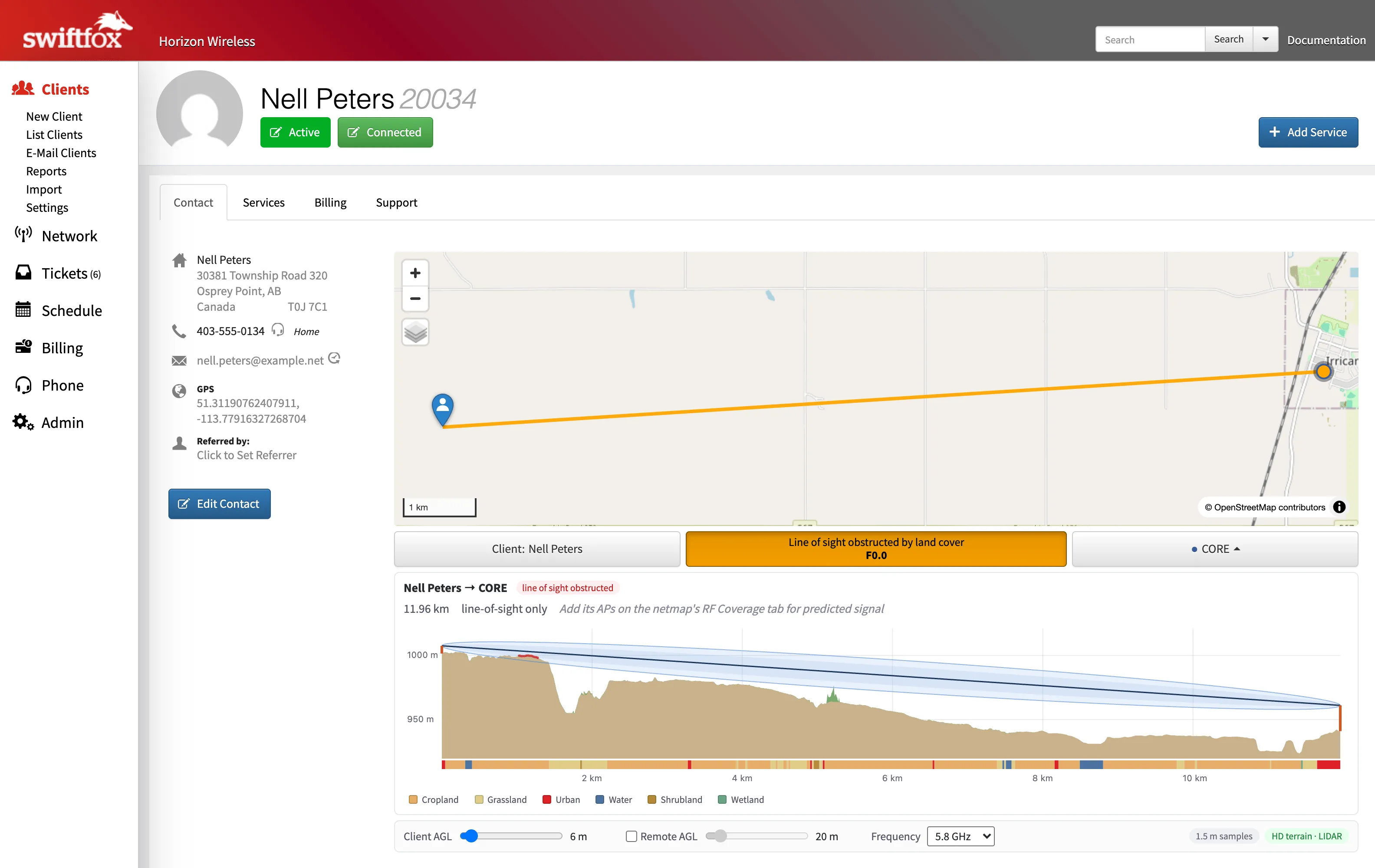
The line of sight tool on the customer page is in the same place and works the same way as before, but it now runs on the same RF system as the coverage maps. Where open LIDAR exists for your area the selected path is sampled about every 1.5 to 2 m from surface data that includes trees and buildings, where the old tool had 30 m terrain and a rough guess at tree height. Everywhere else it falls back to the 30 m baseline.
Because the LIDAR surface sees individual trees and rooflines, some paths that used to read clear will now show as obstructed by land cover, quite often from something right beside the customer's house. If a result looks off, check where the pin is first. The Client button (or double clicking the path plot) zooms into aerial imagery of the customer, and editing the contact lets you drag the pin onto the spot on the roof where the radio would go.
If you've set up your APs on the RF Coverage tab in the new network map, the plot also shows predicted signal and an estimated data rate for each sector, and sectors on the same tower are grouped under their site with the best one shown first. Without them it works as a line of sight tool from your sites and default heights, like before. The plot reads from the customer toward the tower, and it shows how much Fresnel clearance the path has (for example "F2.5 clear").
The new network map becomes the default on October 6 Improved
The new network map has been available since June under "Actions → Switch to Netmap Beta". Several ISPs have been using it since then, and we've been using all their feedback to work out the bugs and make it better. On October 6 it becomes the default for everyone who hasn't picked one or the other. For now you can always click the "Return to Legacy" button on the right side of the page, and your choice is remembered for your login.
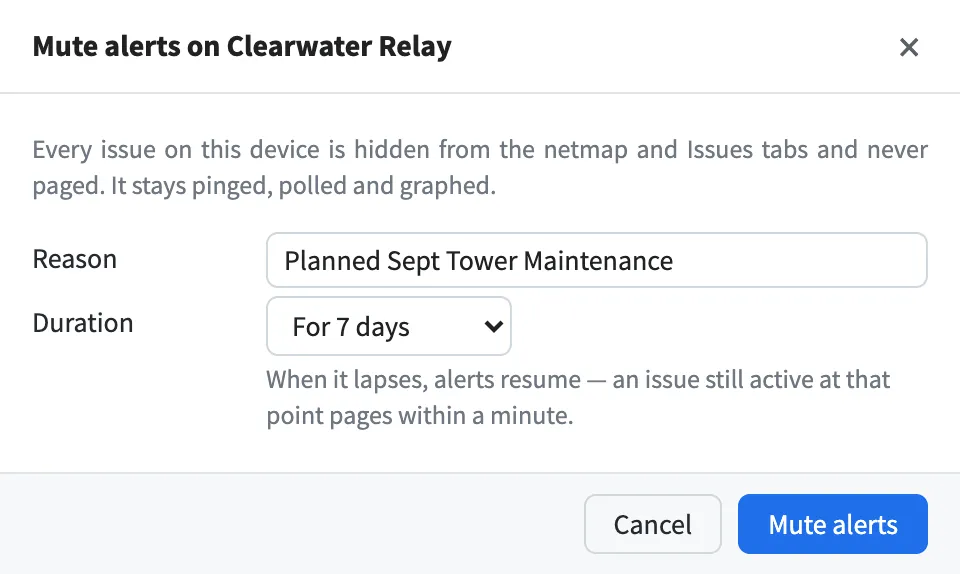
It's a lot faster than the old netmap, even on networks with thousands of subscribers, and it has a handful of features the old one doesn't. You can open an SSH terminal to a device in the browser (it runs through your pingbox, so there's no VPN needed), run a ping or traceroute from anything, see differences between config backups in a cleaner way, and mute alerts on a device with a reason and an expiry. If you switched back to legacy because something is missing or broken, please tell us what it was, as we'd like to fix that! We'll give plenty of notice before the legacy netmap is retired.
Monitoring modes and ignored issues New
Every device now has a monitoring mode: monitored, alerts muted, or unmonitored. A muted device is still polled and graphed but raises no issues and sends no pages, which is handy for a link you know is mid-upgrade. You can also ignore one specific issue on a device or customer rather than the whole thing. Mutes and ignores take a reason and an optional expiry, and Swift Fox shows who set it and when.
The Issues tabs have a Show ignored toggle so nothing disappears for good, and a muted device still counts toward its site and region ping averages. With several devices selected on the map, Bulk Update sets the paging rule, monitoring mode or edge router for all of them at once.
New licensed backhaul support New
Four new hardware types for licensed microwave links, all collected over SNMP. "SAF" covers the SAF Tehnika Integra family (Integra, Integra-S and -G, Integra-W, Integra-E and the dual-radio Integra-X) plus the older CFIP and Lumina line, "Aviat" covers the WTM 4000 series including the 80 GHz WTM 4800, "Trango" covers the Apex Lynx and Apex Orion, and "Ceragon" covers the IP-20 and IP-50 families, which Cambium sells as the PTP 820 and PTP 850. They report receive level, MSE or SNR, the current modulation and link capacity, frequencies, temperature and the radio port's traffic, so these links get the same backhaul graphs as your unlicensed ones.
All four came from ISPs asking for them and running SNMP walks with us. One thing to know about the SAF radios is that an Integra only answers SNMP from addresses in its manager list, so if a SAF link shows a connection issue after the update, adding your pingbox's IP with "snmp manager add" on the radio is the fix. If you have a device on your network that isn't being monitored properly (a new wireless backhaul, a battery system, anything), let us know and we'll get it added. We haven't met a manufacturer we couldn't add yet!
Radio login on the customer page New
The customer page shows which login Swift Fox is using for each of a customer's radios, with a copy button if you have permission to view credentials and a tag saying whether it was detected automatically or set by hand. You can pin a specific credential from the Network settings for that radio if the automatic one is wrong.
Netmap fixes Fixed
More from feedback on the new map. Switching to map view centres on the site you had selected, clicking a backhaul line in map view opens its backhaul pane (with a picker when several links share the line), and the Site Details tab has a Delete Site button for hidden sites and touch screens. Deleting a device that's part of a backhaul now asks whether to delete the backhauls too or leave them to be reassigned, where before it just refused.
Graphs dim while they're loading a new period so you can tell the data is stale, week and month graphs label the days ("Mon 9/14"), the frequency bar on wireless graphs is the right size on high-DPI screens, and an access point's title shows its subscriber count.
Smaller fixes Fixed
A device reboot could write an impossibly large spike into its bandwidth history (the counter reset was read as a rollover). July's change hid those from the graphs, and this month they stopped being recorded at all. The daily cap on paging emails went from 250 to 2,500 per ISP, after a large on-call team ran into it during a week of flapping links.