RF coverage maps, data export, more beta netmap fixes
The big one this month is RF coverage: Swift Fox now predicts coverage for every sector on your network from LIDAR terrain data, calibrates it against the signal your real customers report, and plots the path to any prospect. Alongside it, a feature to export all your ISP data and another round of netmap beta fixes.
RF coverage maps New
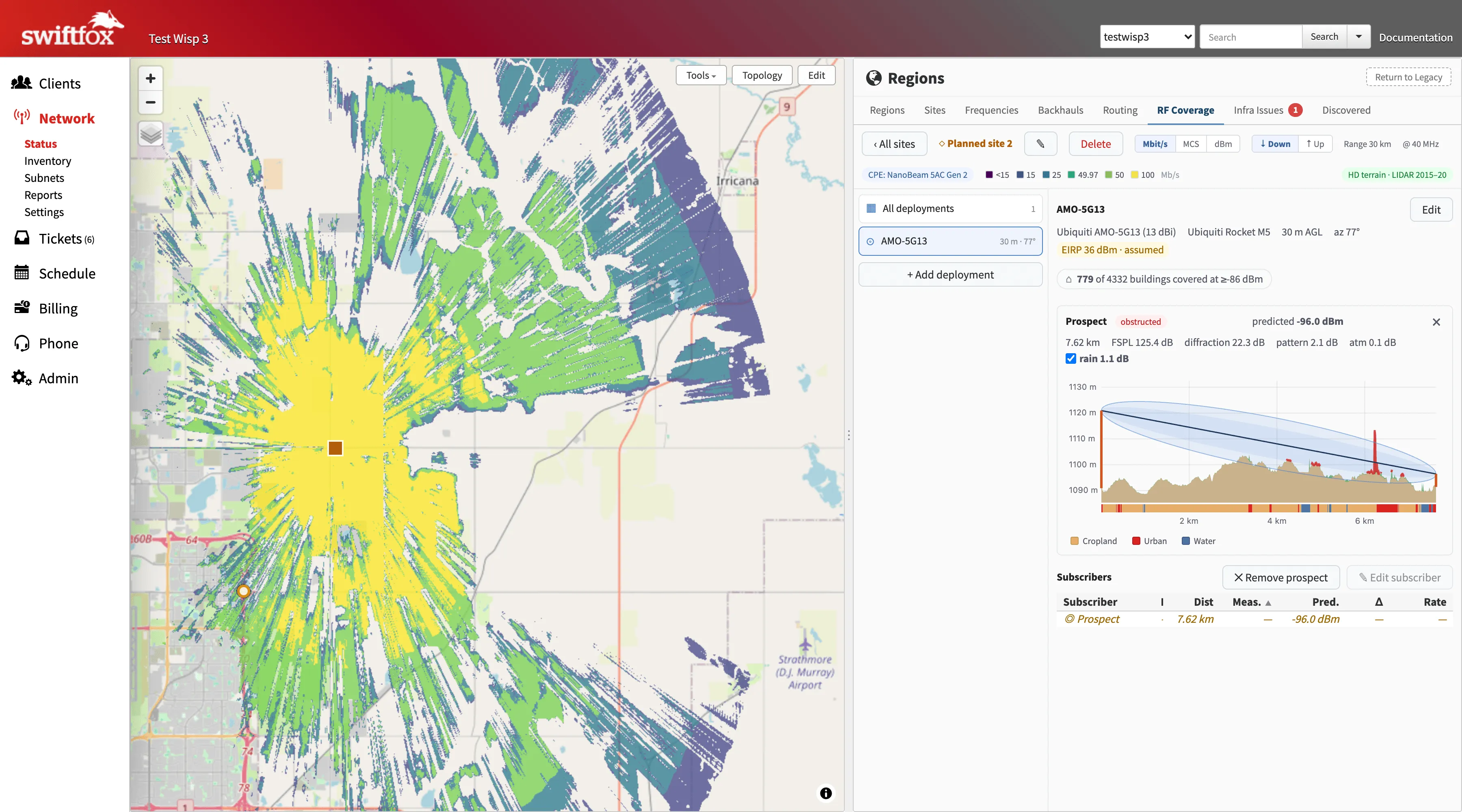
Open the RF Coverage tab on any site in the new network map and you get predicted coverage for each sector drawn over the map, computed from open LIDAR terrain (USGS 3DEP in the US, CanElevation in Canada, with a 30 m Copernicus baseline where no LIDAR exists) and the actual radio and antenna on the tower. Terrain for your area is fetched automatically the first time you open it, and sectors are discovered from the devices Swift Fox already logs into, so there is very little to set up.
Predictions are calibrated against the signal levels your existing customers report, so the model works from the real radiated power of each sector, which is very often not what the datasheet says. Click a subscriber to see the path plot from the tower (terrain, Fresnel zone, land cover along the path, predicted vs measured signal), drop a prospect anywhere on the map to see which sectors can reach them, or plan a new site or sector and see what it would cover before you build it.
There's an azimuth helper that suggests where a sector is really pointing based on where its customers are, an equipment library of about 170 radios and 160 antennas from Ubiquiti, MikroTik, Mimosa, Cambium and RF elements, CPE profiles with a default for new installs, and rain fade and ISED/FCC power limits built in. US networks get feet and miles.
Coverage snapshots for FCC BDC and ISED filings are coming soon. We still have some work to do to make sure everything meets filing requirements, but we hope to have them ready for the early-2027 filing windows. You'll be able to select which of your existing plans you use as "marketing packages" to file under. If you're still on the legacy netmap, it's under Actions → Switch to Netmap Beta.
Data export New
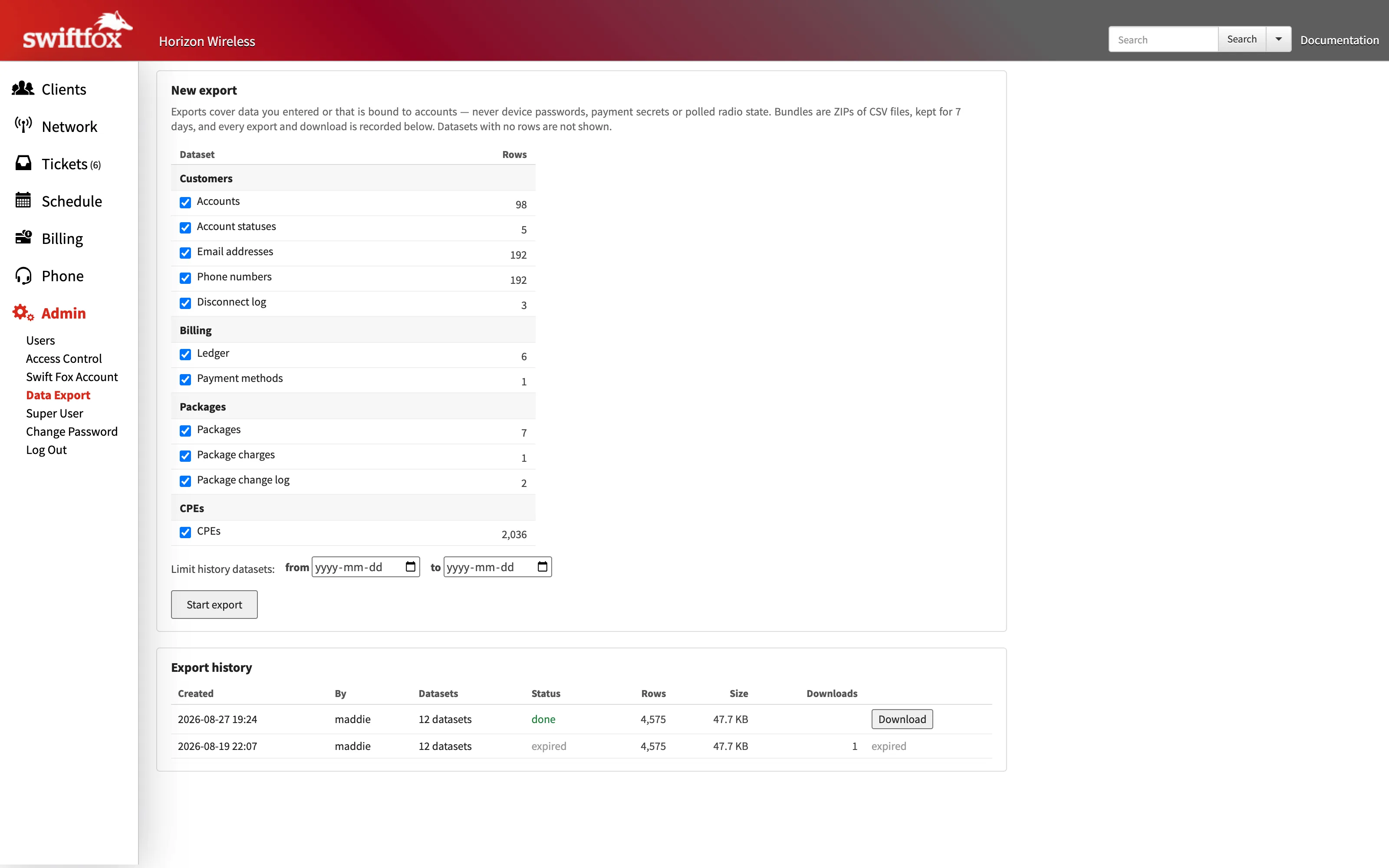
Admin → Data Export is a real export now. Pick from 20 datasets across customers, billing, service packages and CPEs, and Swift Fox builds a ZIP of CSVs (with a manifest) in the background with live progress, then gives you a download link that works for seven days. Every customer-related file carries the account number so you can join them in a spreadsheet.
Exports are behind a new Data Export permission, granted to the roles that can already manage user roles. You can enable it for other roles under Admin → Access Control.
Auto traffic balancing has better error reporting Improved
To help ISPs more easily roll out auto balancing, Swift Fox now checks and alerts for some new types of network misconfigurations: parallel links where only one radio has TE enabled, fixed bandwidth on TE interfaces too small to support enough tunnels, and a loopback address that doesn't match the OSPF router-id.
RSVP failures show in a problems banner on the routing tab that stays up until the tunnel establishes, instead of flickering away between cycles, and the routing tab can be scoped to one network when you run several.
Netmap beta fixes Fixed
Another round from beta feedback. PFO percentage labels on backhauls update live, clicking an access point in map view stays on the map, and hovering a customer row draws a line from the tower to their dot. The region breadcrumb follows map drills, the Backhauls tab colours latency and loss separately, customer names in AP Clients no longer all drift to blue after a while, and the routing tables in the device pane are sortable.
Access points with no subscribers no longer show a phantom grey customer square (that one was in the legacy netmap too, and the subscriber count in the legend drops slightly as a result). Subscriber names are consistent everywhere now: the CPE description if you've set one, otherwise the account name, then the discovered name, then the MAC.
Subnets page and IP details Improved
The Subnets page was rebuilt on the new system from ISP feedback: filter to just the /24s that are actually on your network, pick a /24 to expand, and it works on a phone. The IP detail popup you get by hovering an address anywhere in Swift Fox can now be pinned with a click (or a tap), so that links to the device, site and customer are actually clickable now.
Gateway detection previously used the first router with a route on the subnet, which picked wrong on flat bridged networks and wherever router IDs collide. It now scores candidates from routing tables, ARP and DHCP together.
CPE login and RouterOS 7 fixes Fixed
Credential chains now advance past a connection failure as well as a bad password, so a CPE whose SSH is on a custom port no longer gets stuck behind a port-22 credential at the top of the chain. Once a port answers, the chain sticks to that port's credentials, so a wrong password is reported as a wrong password. Disconnected customers whose radio still pings but can't be logged into are reported as issues now instead of skipped.
MikroTik Cube 60Pro ac radios upgraded to RouterOS 7 stopped reporting bandwidth counters and link capacity: v7 removed the /system health menu (a parse error there was breaking the whole counter fetch) and reports w60g PHY rates as bare numbers. Both are handled now.
Undo a deposit New
Each previous deposit on the Deposits page has an Undo link, for when a batch was closed with the wrong payments in it: the deposit is removed and its payments go back to the undeposited list. This only works for deposits not part of a Canadian legacy EFT batch, as those are locked to the submitted file.
Call volume report restyle Improved
The call volume report on the Phone page got a restyle: a proper heat ramp on the hourly grid, empty hours hidden, and abandoned calls in red on the chart.